Plumbing photo reports your customers can follow.
Show the problem, the repair and the finished result in one clear PDF. Add job photos and factual captions on your Android phone, then share the report with your customer.
Available on Android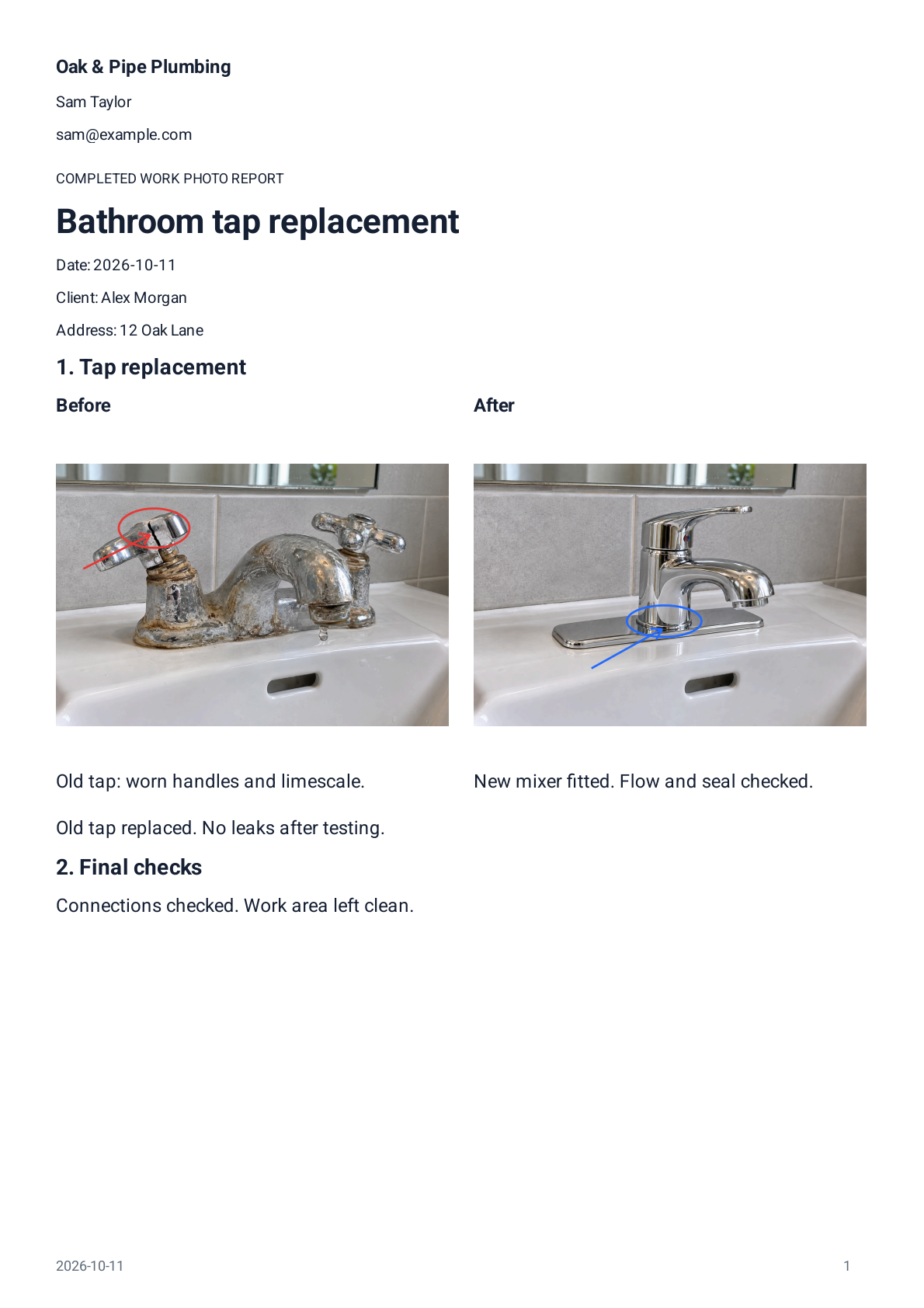
Demonstration export with fictional job details; not a customer case study.
What a plumbing visit report should show
A useful plumbing photo report answers the three questions a customer will ask: what was wrong, what did you do about it, and how do they know? Photograph the observed problem when it is relevant and still visible, the work performed, the accessible connections and finished result, and any checks you actually performed. If you ran a pressure or leak test, say so and record what you observed — if you did not, the report should not imply that you did.
Before-and-after pairs can make a repair obvious, but they are optional. A single clear photo of the finished work with a factual caption often tells the story. Consistency matters more than volume: one captioned photo per work section beats twenty uncaptioned pictures.
- The fault or symptom, when it is relevant and visible
- The work performed, step by step
- Accessible connections after the repair
- The finished result at the fixture
- Any checks you actually completed, recorded as observations
- Example caption
- Replacement mixer tap installed
- Example caption
- Accessible supply connections after the repair
A photo is an observation, not evidence of a pressure or leak test unless you actually performed and recorded one. Reportago does not certify compliance with plumbing regulations or building codes.
A simple plumbing report outline you can copy
The built-in Reportago templates start fresh for every job, without the previous customer's photos or details, and empty sections you leave unused do not appear in the PDF. Use the outline below as a starting point and adapt it to the work you actually completed.
Job details
Work performed
Photos and captions
Checks actually completed
Follow-up notes
From photos to PDF in three steps
Reportago keeps the flow simple so it fits between jobs, not after hours.
- Take photos directly in the app or import them from your gallery, organized into the work sections of the report.
- Add factual captions, and use arrows or circles to point out a repaired seal or a connection you checked. The original photo stays untouched.
- Tap Show PDF, review the finished document, then share it or export it however you like.
Practical details
Reports are created and edited locally on your Android device and work offline — no Reportago account is required. You can keep editable backups you control, revisit generated PDF versions, and reuse your company details and a saved worker signature on new reports. A client can optionally sign on the screen when the job calls for it; these are report additions, not certified digital signatures.
Reportago is free to download. Your first five reports include all report features for free; after that, creating more reports requires one Lifetime purchase, with the final local price shown in Google Play. There are no subscriptions or timed trials.
A few practical questions
Does every job need before-and-after photos?
No. A before-and-after pair is useful when the change is visible — a replaced tap, a repaired leak — but it is never required. One well-captioned photo of the finished work is a perfectly good record.
Can a photo prove I tested for leaks?
No, and Reportago will not pretend otherwise. A photo is an observation. If you performed a pressure or leak test, note that you completed it and what you observed; the report records your work, it does not certify it.
Do I need an account or an internet connection?
No account is required, and you can create and edit reports offline on your Android device. Purchases and some sharing destinations may need a connection.
What does it cost?
Reportago is free to download. Your first five reports include all features for free; additional reports require one Lifetime purchase, with the final local price shown in Google Play. No subscriptions, no timed trials.
A cleaner handover starts with one photo.
Free to download. First five reports free, then one Lifetime purchase.
 Available on Android